The Borrowed Orbit
Find an accomplice
Prompt 2
SEEDANCE 2.5 · VIDEO-TO-VIDEO · 7S · 9:16 FORMAT: 7s / 9:16 vertical / pet and environment replacement / one continuous shot, no cuts REFERENCES: @Video 1 is the camera and timing master. Copy its camera movement exactly: same path, same speed, same acceleration, same duration, same lens, same framing, same motion blur, and the animal's position, pose, scale and behavior in frame. Every camera move in @Video 1 must be reproduced completely and at identical speed, from the first frame to the last frame. Do not inherit its room, furniture, carpet, lighting, color grading or original cat. @Image 1 defines ONLY the replacement pet, a cat or a dog. Preserve this animal's face, eye color, fur color, fur pattern, fur length, ear shape, body size and proportions exactly as shown in @Image 1. Do not inherit the background, floor, furniture or lighting from @Image 1. [optional: add a short description of your pet here, e.g. "small fluffy white dog with brown ears"] @Image 2 defines ONLY the environment. Preserve this room, its layout, furniture, floor, materials, colors and lighting exactly as shown in @Image 2. Do not inherit any camera angle or framing from @Image 2. VIDEO PROMPT: Recreate @Video 1 with the pet from @Image 1 inside the environment from @Image 2. The pet sits on the floor of @Image 2, taking the exact same position, pose, scale, orientation and behavior as the original cat at every moment of the video, head and eyes following the camera the same way. The furniture of @Image 2 appears where the original room's furniture appeared along the camera path. If the pet is larger or smaller than the original cat, keep its body center and floor position identical and scale the body naturally. The lighting of @Image 2 wraps the fur naturally, with matching shadows on the floor and correct occlusion as the camera passes furniture. Photorealistic, real fur physics, natural animal motion. Camera lock: the camera is a frame-by-frame copy of @Video 1. It starts on the same extreme close-up of the face, pulls back at the same fast speed, performs the same full low-angle 360-degree orbit around the seated pet at the same speed and in the same direction, passes low under furniture at the same moment, and returns to the same final close-up of the face at the same moment. The full orbit must be completed within the 7-second duration. Do not slow the camera down, do not shorten or cut the move, do not stop the orbit early, do not hold on the pet longer than @Video 1 does, and do not add any camera move that is not in @Video 1. Whip-pan speed and motion blur intensity match @Video 1 exactly. AUDIO: quiet room tone, soft fur and floor sounds, no music. CONSISTENCY: Exactly one animal. Same pet identity and same room from first frame to last. Camera path, speed, direction and timing identical to @Video 1 for the entire duration. NEGATIVE PROMPT: no second animal, no original tabby cat, no identity change, no breed change, no eye color change, no fur pattern drift, no slow camera, no slow motion, no incomplete orbit, no camera stopping early, no static hold, no shortened camera move, no change to camera path, speed or direction, no new cuts, no blue carpet, no original room from @Video 1, no room layout drift, no flicker, no cartoon, no cheap CGI, no on-screen text, no watermark.
Other prompts in this tutorial
Prompt 1
Set Seedance 2.5 to 7 seconds and 9:16, attach the three references in the order above — video first, pet second, room third — and paste the prompt below without editing a character. The only line you may touch is the bracketed optional one: replace it with a short description of your own animal, or delete it. Everything else, including the negative prompt, stays as written.
Tutorial
DENIZ AKKABAK · SEEDANCE 2.5 TUTORIAL · @DENIZ.AKKABAK
MADE IN INVIDEO · invideo.io/i/DENIZ-ig

The Borrowed Orbit
Turn one finished video into a camera template — Seedance 2.5 runs the same 360° move around your pet, inside your room, from three references.
A TUTORIAL BY DENIZ AKKABAK · @DENIZ.AKKABAK
PIPELINE SEEDANCE 2.5 · VIDEO-TO-VIDEO · FORMAT 7S · 9:16 · GENRE PET PORTRAIT
Every pet owner wants the same impossible shot: a camera that starts inside the whiskers, whips backwards, dives under the coffee table and circles the animal at floor level before landing back on the eyes. Nobody can shoot that in a living room with a real cat — the cat leaves, the lens hits the sofa, the light changes. So don't shoot it. Borrow it.
Seedance 2.5 can treat a finished video as a camera master. Given a clip, it will keep the move, the timing and the animal's blocking, and rebuild everything else — the animal from one photograph, the room from another. That turns the shot you are watching above into a template: attach it as @Video 1, add a front-facing photo of your own cat or dog, add a photo of any room you like, paste the prompt, and the same orbit runs again around your animal, in your space, in seven seconds.
THE PIPELINE AT A GLANCE
- 01
Three references
The clip above as @Video 1 (camera, timing, blocking), a front-facing photo of your pet as @Image 1 (identity), a photo of a room as @Image 2 (environment). Order matters — the prompt names them by number.
- 02
One prompt, one shot
Seedance 2.5 video-to-video, 7 seconds, 9:16, no cuts. The prompt tells each reference exactly what it may and may not contribute, then locks the camera to the master frame by frame.
STEP 01 · REFERENCES — SEEDANCE 2.5
The Three Inputs — Attach in This Order
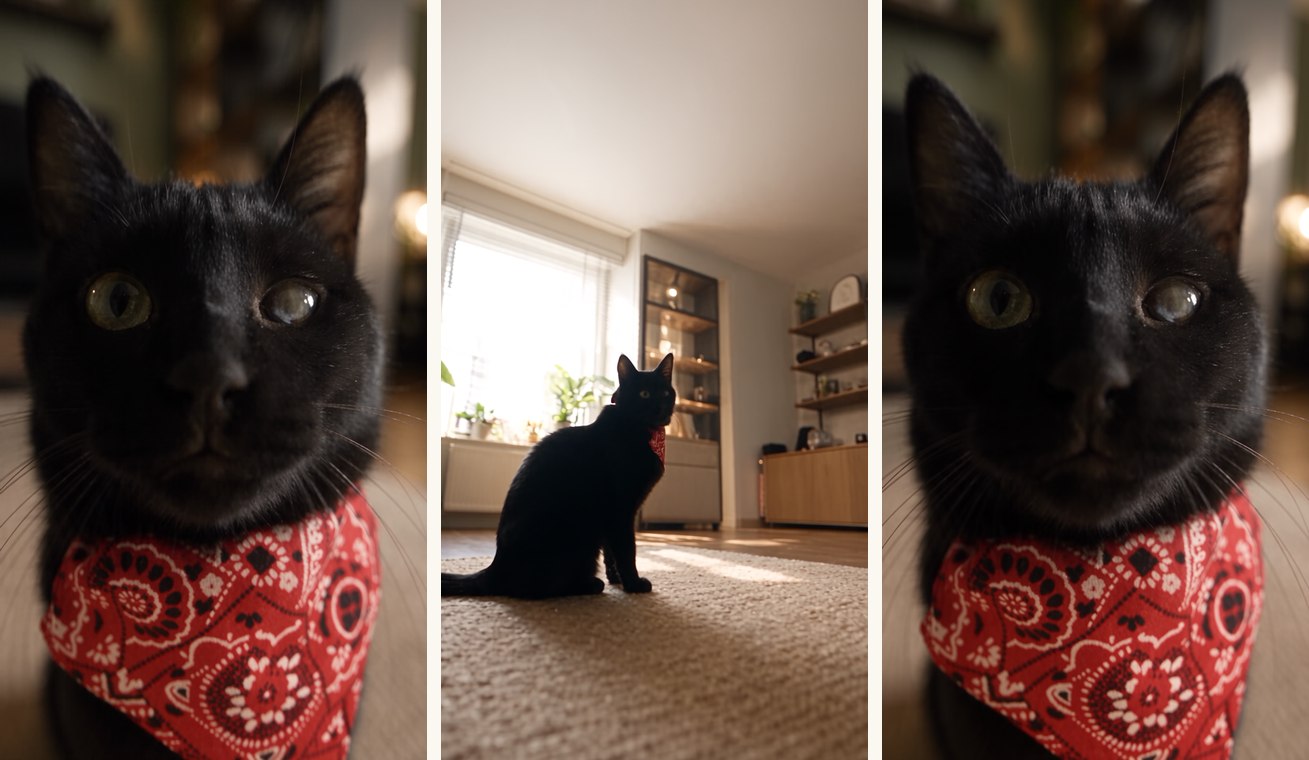
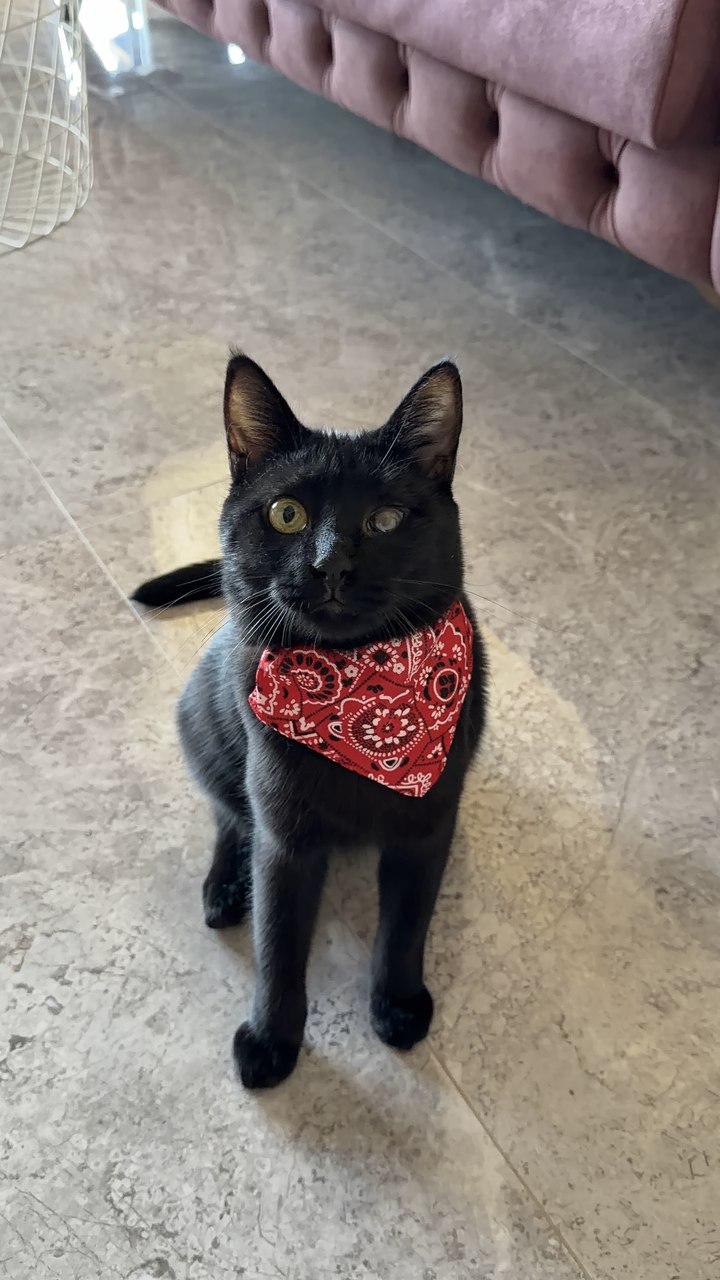
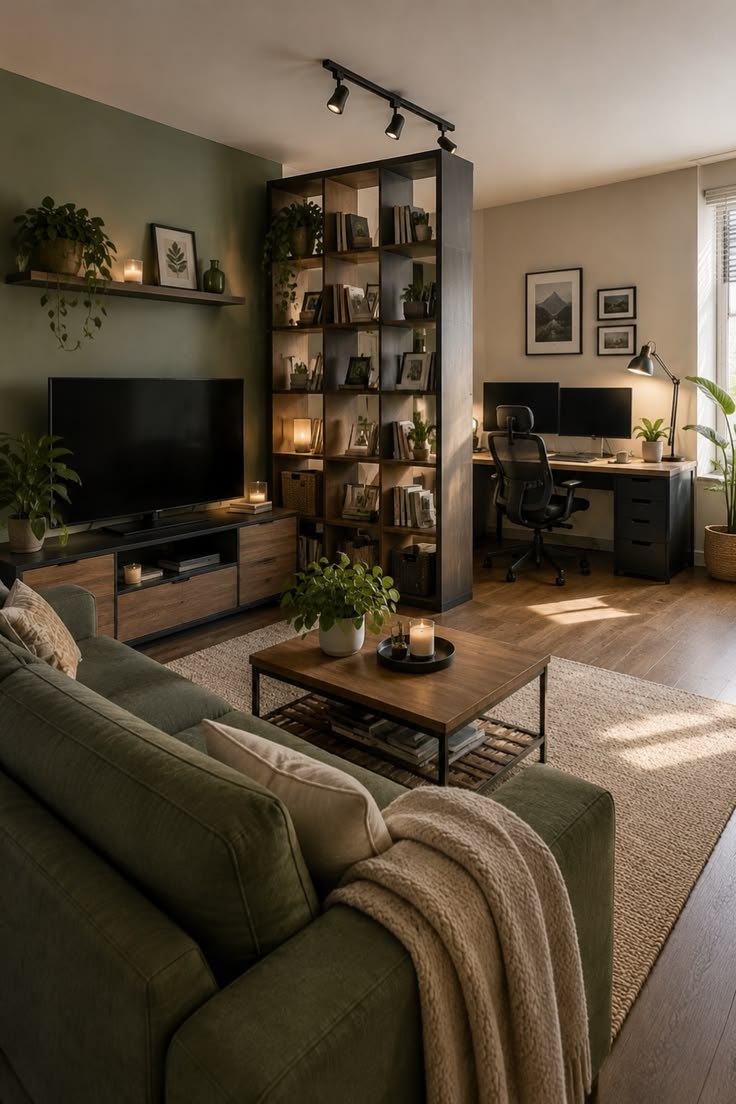
The whole trick lives in a division of labour. Each reference is allowed to contribute exactly one thing, and the prompt says so out loud — @Video 1 is “the camera and timing master”, @Image 1 “defines ONLY the replacement pet”, @Image 2 “defines ONLY the environment”. Because every reference also carries a “do not inherit” clause, the model cannot smuggle the master clip's rug into your room or your kitchen's light onto your dog. Below are the three inputs behind the clip above: the master video, the photograph of my cat, and the photograph of the room. Shoot the pet photo at the animal's eye level, front-on, in even light — the identity lock copies what it sees, so a clean, well-lit face gives Seedance the most to hold on to. The room photo can be any angle; the prompt discards its framing and keeps only the space.
REFERENCE 1 — @VIDEO 1, THE CAMERA MASTER
REFERENCE 2 & 3 — @IMAGE 1 AND @IMAGE 2
STEP 02 · THE PROMPT — SEEDANCE 2.5
Prompt 1
Set Seedance 2.5 to 7 seconds and 9:16, attach the three references in the order above — video first, pet second, room third — and paste the prompt below without editing a character. The only line you may touch is the bracketed optional one: replace it with a short description of your own animal, or delete it. Everything else, including the negative prompt, stays as written.
Prompt 2
SEEDANCE 2.5 · VIDEO-TO-VIDEO · 7S · 9:16
7s / 9:16 vertical / pet and environment replacement / one continuous shot, no cuts
@Video 1 is the camera and timing master. Copy its camera movement exactly: same path, same speed, same acceleration, same duration, same lens, same framing, same motion blur, and the animal's position, pose, scale and behavior in frame. Every camera move in @Video 1 must be reproduced completely and at identical speed, from the first frame to the last frame. Do not inherit its room, furniture, carpet, lighting, color grading or original cat. @Image 1 defines ONLY the replacement pet, a cat or a dog. Preserve this animal's face, eye color, fur color, fur pattern, fur length, ear shape, body size and proportions exactly as shown in @Image 1. Do not inherit the background, floor, furniture or lighting from @Image 1. [optional: add a short description of your pet here, e.g. "small fluffy white dog with brown ears"] @Image 2 defines ONLY the environment. Preserve this room, its layout, furniture, floor, materials, colors and lighting exactly as shown in @Image 2. Do not inherit any camera angle or framing from @Image 2.
Recreate @Video 1 with the pet from @Image 1 inside the environment from @Image 2. The pet sits on the floor of @Image 2, taking the exact same position, pose, scale, orientation and behavior as the original cat at every moment of the video, head and eyes following the camera the same way. The furniture of @Image 2 appears where the original room's furniture appeared along the camera path. If the pet is larger or smaller than the original cat, keep its body center and floor position identical and scale the body naturally. The lighting of @Image 2 wraps the fur naturally, with matching shadows on the floor and correct occlusion as the camera passes furniture. Photorealistic, real fur physics, natural animal motion. Camera lock: the camera is a frame-by-frame copy of @Video 1. It starts on the same extreme close-up of the face, pulls back at the same fast speed, performs the same full low-angle 360-degree orbit around the seated pet at the same speed and in the same direction, passes low under furniture at the same moment, and returns to the same final close-up of the face at the same moment. The full orbit must be completed within the 7-second duration. Do not slow the camera down, do not shorten or cut the move, do not stop the orbit early, do not hold on the pet longer than @Video 1 does, and do not add any camera move that is not in @Video 1. Whip-pan speed and motion blur intensity match @Video 1 exactly.
quiet room tone, soft fur and floor sounds, no music.
Exactly one animal. Same pet identity and same room from first frame to last. Camera path, speed, direction and timing identical to @Video 1 for the entire duration.
no second animal, no original tabby cat, no identity change, no breed change, no eye color change, no fur pattern drift, no slow camera, no slow motion, no incomplete orbit, no camera stopping early, no static hold, no shortened camera move, no change to camera path, speed or direction, no new cuts, no blue carpet, no original room from @Video 1, no room layout drift, no flicker, no cartoon, no cheap CGI, no on-screen text, no watermark.
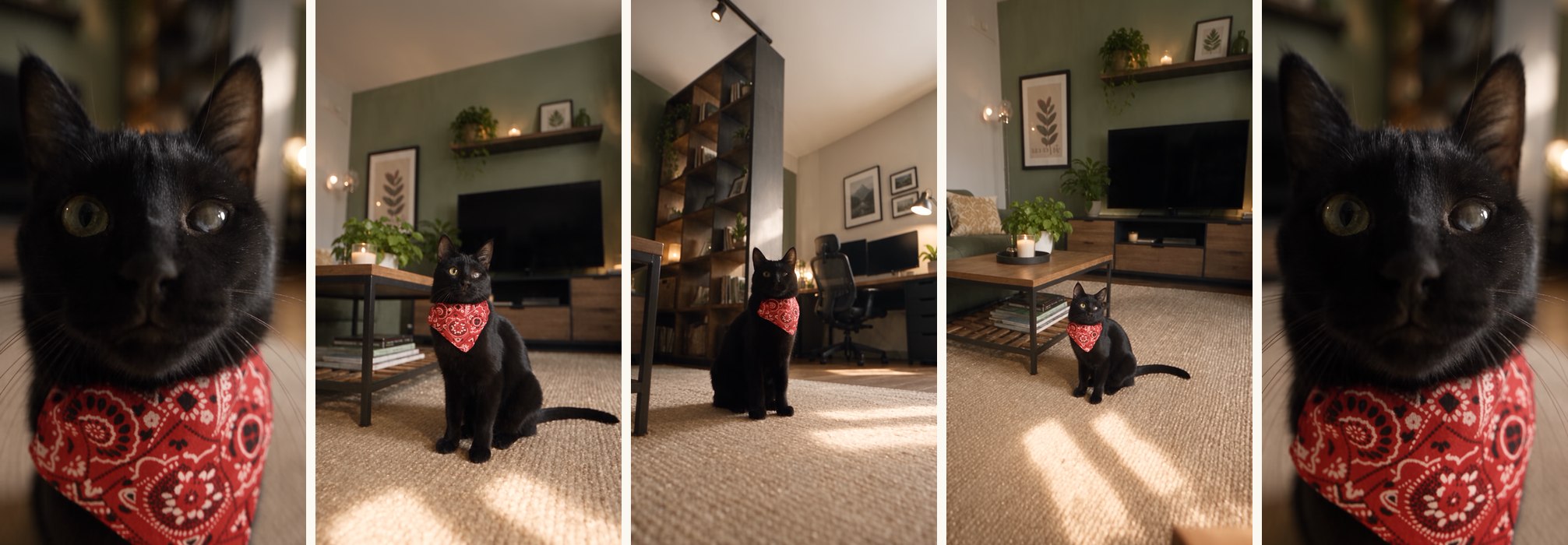
OUTPUT — FIVE CHECKPOINTS OF THE ORBIT
STEP 03
Anatomy — Why the Orbit Transfers
The prompt is long because a video-to-video swap has more ways to fail than a text-to-video shot: the camera can slow down, the orbit can stop early, the original animal can bleed through. Every block below closes one of those doors, and every claim is anchored to a line you just pasted.
- 01
The contract
“FORMAT: 7s / 9:16 vertical / pet and environment replacement / one continuous shot, no cuts.” The first line names the job as a replacement, not a creation. Seedance now knows the source clip is the truth about motion and everything else is negotiable — and that it may not cut.
- 02
Three references, three jobs
“@Video 1 is the camera and timing master”, “@Image 1 defines ONLY the replacement pet”, “@Image 2 defines ONLY the environment.” Each reference gets a capitalised ONLY and a matching “Do not inherit” list. That is what stops the master clip's room leaking into yours.
- 03
The camera lock
“The camera is a frame-by-frame copy of @Video 1” — then the move is spelled out in order: extreme close-up, fast pull-back, full low-angle 360° orbit, the pass under furniture, the return. Naming each beat lets the model check itself against the clip at every moment.
- 04
The transplant logic
“The furniture of @Image 2 appears where the original room's furniture appeared along the camera path.” The occlusions are inherited from the master; only what is occluding changes. The scale clause — “keep its body center and floor position identical and scale the body naturally” — is why a small dog or a big cat still sits in the same place.
- 05
The light wrap
“The lighting of @Image 2 wraps the fur naturally, with matching shadows on the floor and correct occlusion as the camera passes furniture.” Without this line the pet is a cut-out; with it the room's lamps and window fall onto the animal and the shot reads as photographed.
- 06
Sound as room tone
“AUDIO: quiet room tone, soft fur and floor sounds, no music.” A home video has a home's silence. Asking for fur and floor sounds instead of a score keeps the clip in the world of a phone recording, which is exactly where a pet video belongs.
- 07
The insurance
The negative prompt bans every failure separately: “no slow camera, no slow motion, no incomplete orbit, no camera stopping early, no static hold.” The two oddly specific bans — “no original tabby cat”, “no blue carpet” — name whatever lived in the master clip the prompt was first written for; leave them in, they cost nothing and they set the pattern.
THE RESULT
Output — A Living Room That Was Only Ever a Photo
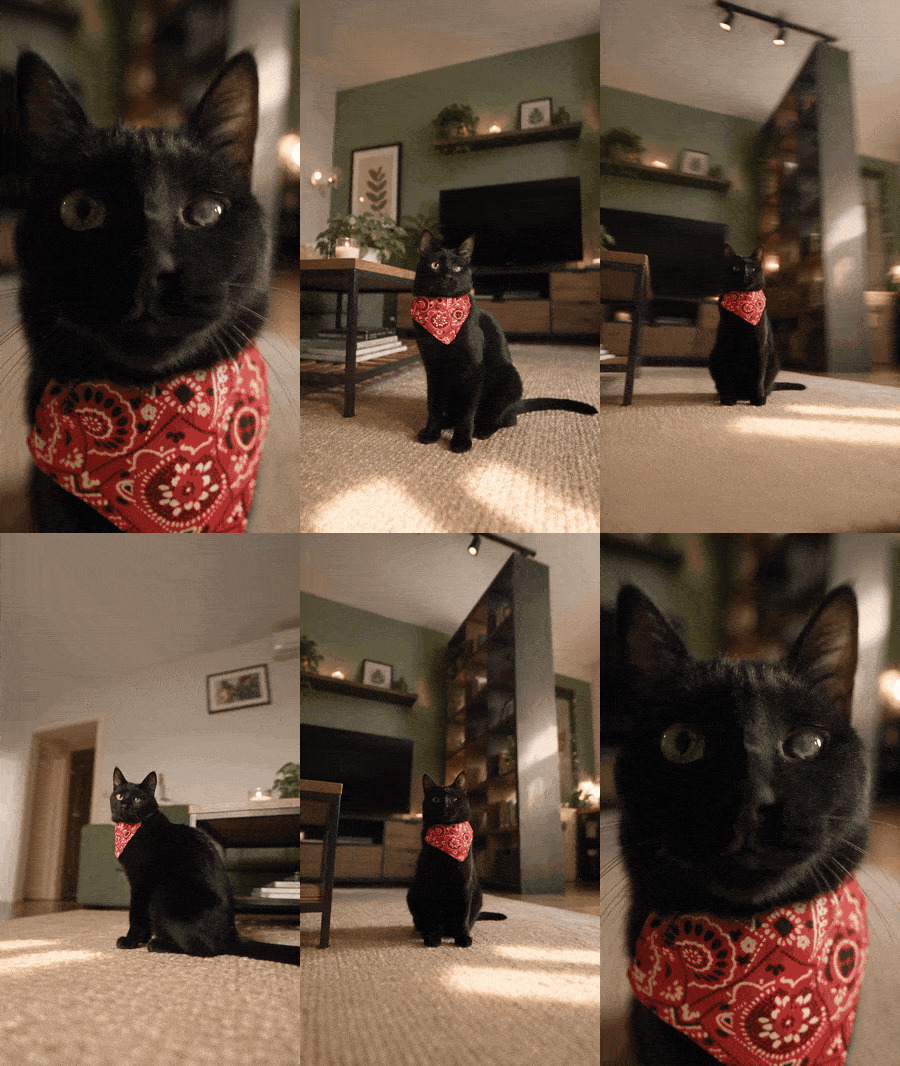
Check your own result against the master clip, not against your memory of it. Play both side by side: the close-up should open at the same instant, the pull-back should reach the wide at the same beat, and the orbit should complete — a full circle, not three quarters — before the return to the face. If the camera lingers or the circle falls short, the prompt has not changed; regenerate. If the animal's eyes or fur drift, retake @Image 1 in flatter light and try again. The room is the easy part — it almost always lands on the first pass.
THE SHOT IS THE TEMPLATE
You don't have to film the impossible move. You only have to borrow it.
Swap the cat for a dog, the living room for a kitchen, the jute rug for a hallway runner — the skeleton carries any animal that can sit still for a photograph. Keep the master clip as @Video 1, keep the three-reference division of labour, keep the camera lock and the insurance, and the same seven-second orbit will run around whoever is waiting on your floor.

This film was generated with Seedance 2.5 inside invideo — video-to-video, three references, one prompt. Start your own orbit here:
WRITTEN, DIRECTED & PROMPTED BY DENIZ AKKABAK · @DENIZ.AKKABAK